Every fashion founder knows the feeling. Your SS26 drop is live, the ads are running, and by day three you still can't tell which styles are working, which sizes are about to sell out, and which ones will sit in the warehouse until EOSS.
The data is all there inside Shopify. Pulling a clear answer out of it is the hard part, especially when you're juggling size and variant complexity, seasonal demand swings, and a high SKU count.
In this guide, we'll break down the top Shopify features and metrics fashion brands lean on the most, and how they come together to drive smarter replenishment.
1. Product Tags: The Backbone of Merchandising

A product tag in Shopify is a free-form label you attach to a product. You can apply up to 250 tags to a single product, and they can be up to 255 characters long though anything over 16–20 characters starts to get unwieldy.
Tags sit alongside the product, not inside the description, which means they stay invisible to customers unless your theme deliberately surfaces them as filters or badges.
That small detail matters: tags are both a customer-facing navigation layer and a behind-the-scenes operational tool, depending on how you use them.
How fashion brands use product tags
The brands that get the most out of tags treat them less like keywords and more like a taxonomy, a set of dimensions the whole business agrees on. A typical fashion tag structure looks something like this:
- Season:This is the one tag every brand eventually standardises, because it drives everything from homepage banners to sell-through reports. Example, season-ss25, season-aw25, summer-edit, pre-fall.
- Occasion: Occasion tags are gold for collection pages and paid social "shop wedding guest" is a far better landing page than "shop dresses." Example, wedding, partywear, resort, workwear, daywear.
- Trend: Trends move faster than seasons and are usually how your buying team actually thinks. Tagging by trend means you can see a trend's sell-through in isolation, instead of guessing. Example, oversized, co-ords, quiet-luxury, sheer, barrel-leg.
- Attribute: These tend to overlap with Shopify's newer storefront filters and metafields, but keeping them as tags gives you flexibility for quick campaigns. Example, fabric-linen, color-sand, fit-relaxed.
- Ops-only: Tags starting with a prefix like ops- or internal- are easy to hide from the storefront and keep your back-of-house tidy. Example, restock-priority-1, supplier-a, photoshoot-needed.
A single linen co-ord set might carry nine tags across those buckets enough to appear in the SS25 edit, the resort landing page, the co-ords trend collection, the linen filter, and the buying team's reorder shortlist, without anyone having to rebuild those views by hand.
Why it matters
Tags power collections, filters, and campaigns. Automated collections pull products by tag rules (tag = occasion-wedding builds a self-maintaining landing page).
Storefront filters, email segments, and discount codes all key off the same labels. Tag once, and the product shows up everywhere it needs to.
Inventory impact
Tags are also the cleanest way to slice inventory by the dimensions buying teams plan against. Sell-through by season, by trend, by occasion, none of these views exist in Shopify's default reports, but all of them become trivial with consistent tags.
That's what unlocks trend-based and seasonal planning at the cohort level, not just the SKU level.
How EasyReplenish leverages product tags
Easy Replenish converts your existing Shopify tags into planning cohorts, no manual segmentation needed:
- Season tags drive seasonality curves, so SS25 products are benchmarked against SS25 demand patterns, not last year's averages.
- Trend tags surface emerging demand clusters early, flagging capsules like co-ords or oversized before they run out.
- Occasion tags align replenishment with campaign spikes like Diwali, wedding season, or EOSS.
These cohorts power ready-to-use report templates:
- "Top Styles by Season (SS25) at Risk"
- "Wedding Collection: Low Stock Alert"
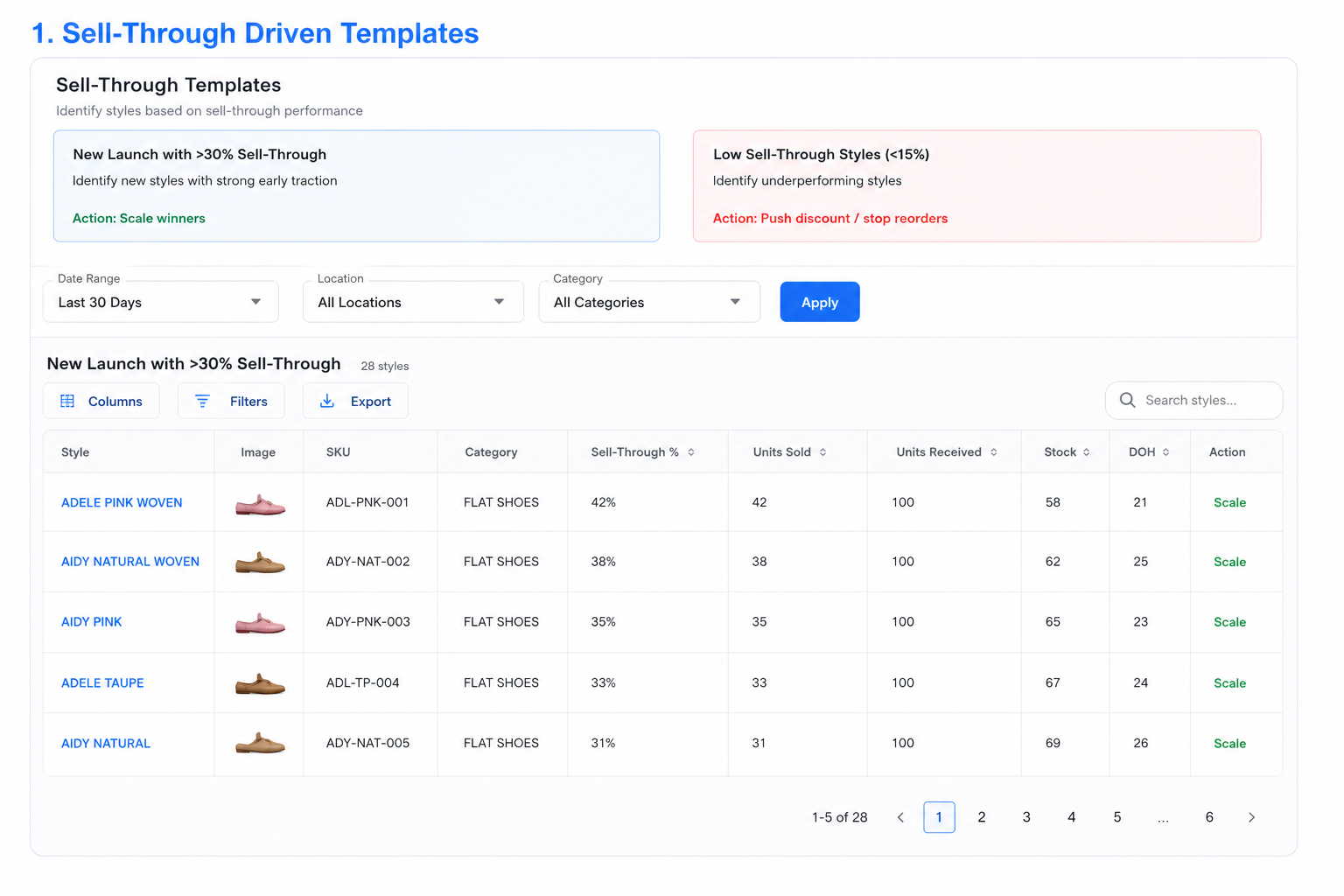
- "New Arrivals (Tagged) with High Early Sell-Through"
Your tags stop being just a merchandising tool and become the input layer for replenishment. No spreadsheets, no manual segmentation. The same labels your team uses to build collections now directly feed reorder priorities, so the products driving your sell-through get restocked first.
2. Collections: Dynamic Storefront Control

Collections are product groupings in Shopify, either manual (hand-picked) or automated (rule-based, often driven by tags, price, or inventory level). They're the building blocks of every category page, campaign landing page, and homepage edit on your storefront.
How fashion brands use it
Collections are where merchandising actually lives. Fashion brands run collections like "New Arrivals," "Best Sellers," "Back in Stock," alongside campaign edits like "Festive Drop," "Resort Edit," or "Under ₹2,000."
Automated collections update themselves as products get tagged or restocked, so the storefront stays fresh without manual work before every drop.
Why it matters
- Drives discovery: Collections are how shoppers navigate beyond the homepage.
- Powers campaigns: Paid ads and email flows point directly to collection pages.
- Boosts conversion: The right edit shown to the right customer turns browsing into buying.
- Stays fresh automatically: Rule-based collections update as products get tagged or restocked.
Inventory impact
Collections also reveal demand clusters. When "Wedding Edit" consistently outperforms "Workwear," that's a replenishment signal, not just a merchandising one. Tracking sell-through at the collection level helps identify which groupings deserve reorder priority and which should be marked down, so buying decisions align with what's actually moving.
3. Product Variants: Managing Size & Color Complexity

Variants are the size, color, and fit options that sit under a single product in Shopify. One "Linen Co-ord Set" listing might contain 15 variants across three colors and five sizes, each with its own SKU, price, and inventory count.
How fashion brands use it
Variants keep the catalog clean while capturing the full range. Instead of listing every size and color as a separate product, brands group them under one parent, so shoppers see one product page with size and color selectors, and the back end tracks stock for each combination independently.
Why it matters
- Inventory happens at variant level: Stock, reorders, and stockouts are tracked per SKU, not per product.
- Cleaner storefront: One product page handles every size and color, without duplicating listings.
- Accurate reporting: Sell-through and velocity are measured at the variant, where the real demand signal lives.
- Smarter fulfillment: Each variant has its own barcode and location data, so picking and packing stays accurate.
Inventory impact
Variant-level data is where replenishment gets sharp. It surfaces broken size curves (M and L sold out while XS sits full), separates fast sizes from slow ones, and drives size-wise reorder quantities instead of blanket restocks. Reordering the full size run when only two sizes are moving is how dead stock piles up.
4. Metafields: Structured Product Intelligence

Metafields are custom attributes you add to products beyond Shopify's default fields, like fabric, fit, wash care, or country of origin. Unlike tags, metafields are structured and can be displayed directly on product pages.
How fashion brands use it
Brands capture the details shoppers care about: "100% linen," "relaxed fit," "hand wash cold." These appear on PDPs, power storefront filters, and feed search engines.
Why it matters
- Richer PDPs: Structured attributes render cleanly, no description clutter.
- Better filtering: Shoppers filter by fabric, fit, or care.
- SEO gains: Structured data improves visibility in Google and AI search.
Inventory impact
Metafields unlock attribute-level demand planning. Instead of tracking "dresses," you can see how linen performs versus cotton, or relaxed fits against tailored. That's the insight that shapes next season's buying, not just this season's reorders.
Metrics Used by Fashion Brands on Shopify
1. Sell-Through Rate (SKU - Variant Level)

What Shopify Gives
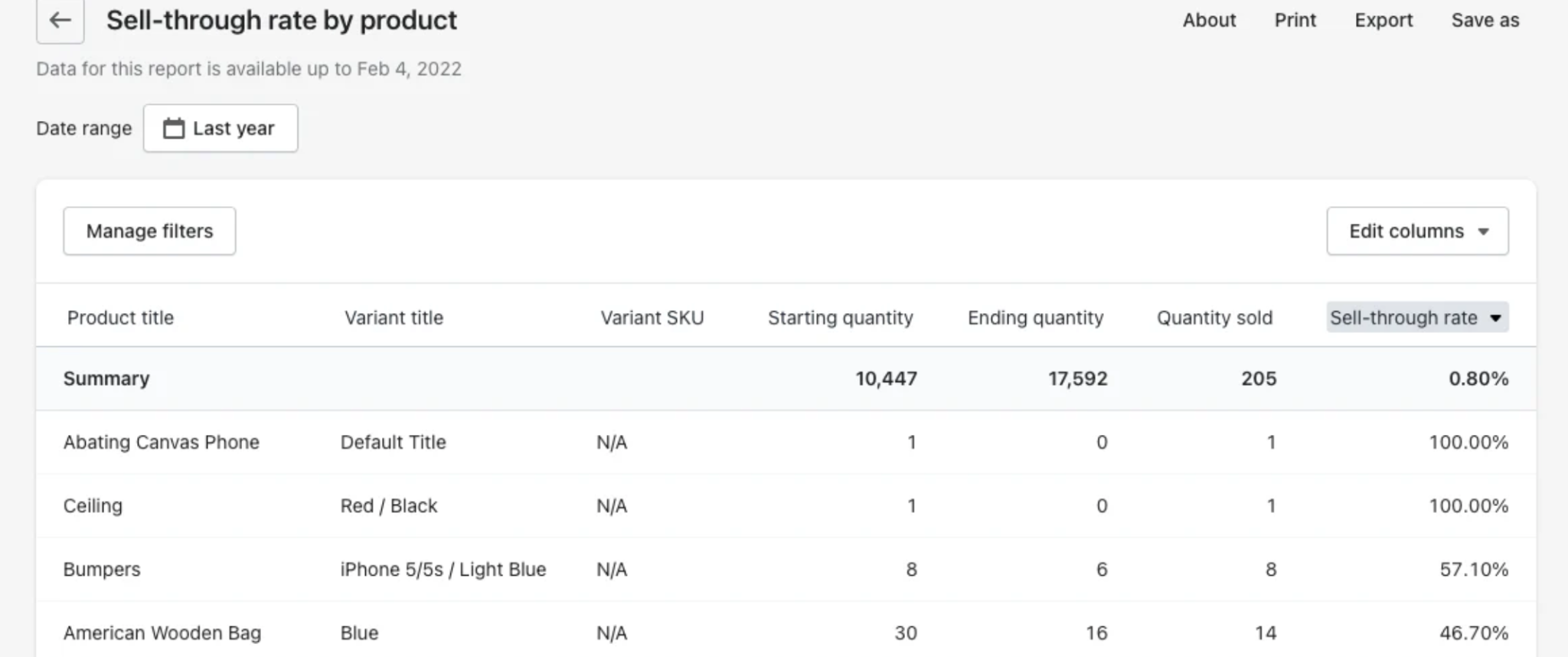
Sell-through is typically visible at the SKU/variant level:
- Units sold ÷ units received (% of inventory sold)
- Useful for measuring early traction especially new launches
- But difficult to evaluate performance across an entire fashion style
How EasyReplenish Extends It for Fashion:

- Apparel use: Identify winning styles before they sell out and losing ones before they pile up.
- Triggers: Above 30% in the first few weeks, scale inventory. Below 10 to 15%, rethink pricing or positioning.
2. Days of Inventory (DOH) by Variant

How many days of stock you have left based on current sales velocity, calculated at the variant level.
What Shopify Gives
DOH (Days on Hand) is usually calculated at:
- SKU level
- Variant level
Useful, but operationally fragmented.
How EasyReplenish Extends It for Fashion:

- Apparel use: Detect broken size curves early. If M has 5 DOH and XS has 80, that's not a product problem, that's a size-mix problem.
- Benchmark: Aim for around 30 days DOH on active styles, enough buffer to reorder without overstocking.
Key Takeaways
Fashion inventory planning comes down to three layers working together:
- Shopify creates the structured commerce data. Tags, collections, variants, and metafields aren't just storefront tools, they're the foundation that makes everything else possible.
- Metrics interpret that data. Sell-through, DOH, turnover, stockout rate, and full-price split turn raw numbers into performance signals.
- Easy Replenish converts those signals into clear actions. Every metric maps to a specific next step, from raising a PO to phasing out a slow mover.
The payoff shows up in three places:
- Faster decisions, because the answer is already waiting for you.
- Better inventory health, with fewer stockouts and less dead stock.
- Higher revenue from the same inventory, because capital flows to what's actually selling.
If your Shopify store is already generating this data, you're halfway there. Easy Replenish handles the rest.
[Start free with Easy Replenish on Shopify] or [book a demo] to see how it works on your own catalog.
FAQs
Fashion brands use Shopify product tags to organize products by season, trend, occasion, fabric, and internal operations, helping teams improve merchandising, demand forecasting, and inventory replenishment.
Shopify collections help fashion brands group products into categories like New Arrivals, Wedding Edit, or Best Sellers, improving product discovery, campaign performance, and storefront merchandising.
Product variants allow brands to track stock separately for each size, color, and fit combination, making it easier to prevent stockouts, manage size curves, and optimize replenishment.
Shopify metafields store structured product information like fabric, fit, wash care, and material details, improving product pages, filtering, SEO, and inventory analysis.
Sell-through rate measures how much inventory has been sold compared to the quantity received, helping fashion brands identify fast-moving products and slow-selling inventory early.
Days of Inventory helps fashion brands understand how long current stock will last based on sales velocity, allowing better replenishment planning and reduced overstocking.
EasyReplenish uses Shopify tags, collections, and sales data to create automated replenishment workflows, low-stock alerts, and inventory planning reports tailored for fashion ecommerce brands.


.png)